1. What a digital shift handover is
A shift handover is the moment one team passes a running line to the next: what happened, what’s still wrong and what needs doing. A digital shift handover records that in an app instead of on a whiteboard, a paper logbook or in a conversation at the line.
The conversation still matters. What changes is that it starts from a written record both teams can see, that open items have an owner, and that the handover can be found again next week when the same fault comes back.
Verbal and paper handovers lose detail for predictable reasons. At the end of an eight-hour shift, people pass on what they remember, not what happened. A whiteboard holds a few words. A logbook holds more, but it sits at one line, it’s hard to read and nobody can search it. And an issue mentioned once on nights has no owner on days, so it comes back.
2. What to include in a shift handover
A good handover covers the same seven areas on every line and every shift. Keeping the order fixed means the incoming team knows where to look, and an empty area becomes a visible “nothing to report” instead of something forgotten.
 Safety: near-misses, hazards, injuries and anything still unsafe, including temporary guards or barriers.
- Quality: deviations, product on hold, complaints and any checks that failed or were missed.
- Production: output against plan, stops and their causes, and where the current order stands.
- Equipment and maintenance: open faults, temporary fixes, work orders raised and anything running outside its normal settings.
- Materials: shortages, changeovers done and what’s staged for the next run.
- People: absences, who is covering which position, and anyone new or in training.
- Open actions: everything unfinished, each with one owner and a due time or shift.
Two details make the difference between a handover and a status update. First, write down workarounds: the sensor you bypassed, the setting you changed to keep the line running. They are exactly what the next shift can’t see and most needs to know. Second, record what you’ve already tried on an open problem, so the next shift doesn’t start from zero.
A weak entry and a strong one
The difference is rarely length. A strong entry says what happened, where, what was done, what’s still open and who owns it.
| Area | Weak | Strong |
|---|---|---|
| Equipment | Filler problems, sorted. | Filler 2 jammed three times between 13:00 and 14:00. Nozzle 4 replaced at 14:10; no jams since. Watch fill weights for the first hour. Spare nozzles: one left, reorder raised. |
| Safety | Spill near line 3. | Oil leak under the line 3 conveyor drive, walkway coned off. Maintenance work order raised; leak not yet fixed. Owner: incoming line lead, check cones at start of shift. |
| Open actions | Check labels. | Labels on batch 2214 to be rechecked against the new artwork before release. Owner: QA on days, by 10:00. |
3. The shift handover procedure, step by step
The handover works best as three stages: the outgoing team prepares, both teams meet, and the incoming team confirms.
Who takes part. At line level, the outgoing and incoming operators or line leads for each line. At area level, the two shift supervisors, who go through what crosses lines: staffing, shared equipment, anything escalated. Maintenance and quality join when they have open work on the line, rather than every time. Keep the group small; a handover with ten people becomes a meeting.
Before the end of the shift
- Set a fixed time to start the written handover, for example an hour before shift end, so it doesn’t compete with the last changeover.
- Go through the seven areas for each line. Write what happened, not just “OK”.
- List every open action with an owner and a due time. Anything without an owner goes to the incoming lead by default.
- Flag the one or two items the incoming shift must deal with first.
The handover itself
- Meet at the line or at the shift board, not in an office, so you can point at the problem.
- Walk through the written handover in the fixed order. Safety first, always.
- Hand over open actions one by one, and get a clear “mine” from the person taking each one.
- Let the incoming team ask questions until they’re satisfied. A handover isn’t done until the receiver says so.
After the handover
- The incoming lead confirms the handover in the system, which records who received it and when.
- Anything unclear is raised straight away, while the outgoing team is still on site.
- The supervisor reviews handovers across lines and escalates anything that has been open for several shifts.
4. Paper vs digital vs AI-drafted handovers
Moving off paper is the big step. Moving from a digital form to an AI-drafted handover mostly changes who does the writing.
| Paper or whiteboard | Digital form | AI-drafted from captures | |
|---|---|---|---|
| When it’s written | At shift end, from memory | At shift end, from memory | During the shift, as things happen |
| Effort at shift end | Writing it all out | Filling in every field | Checking and editing a draft |
| Open items | Passed on verbally, easy to drop | Listed, but need manual follow-up | Carried to the next shift automatically |
| Seen by managers | Only at the line | Anywhere, per line | Anywhere, rolled up across lines |
| Searchable later | No | Yes | Yes, with the original notes and photos |
| Languages | Whatever the writer uses | Usually one | Captured in any supported language, written in the site’s |
A digital form fixes visibility but keeps the main weakness of paper: someone still has to remember eight hours at the end of a long shift. Capturing as you go fixes that, and AI makes the end-of-shift write-up short enough that it actually happens.
What to look for in shift handover software
- Capture from the line. If recording something means walking to a terminal, it won’t happen during the shift. Look for phone capture by voice, photo and text that works without a signal.
- Open items that carry over. Unfinished actions should move to the next handover by themselves and escalate if they stay open, not depend on someone copying them across.
- A fixed structure per line. The same areas in the same order on every line, with a rolled-up view for the supervisor.
- The operator’s language. On multilingual sites, people should capture in their own language and managers read in the site’s.
- Grounded output. If the tool writes summaries, it should write only from what was recorded and say when data is missing, never fill gaps with a guess.
- A record you can search. When a fault comes back next month, you should be able to find every time it was handed over.
5. How an AI-drafted handover works
Here is how it works in Shopfloor AI’s digital shift handover. Other tools differ in the details, but the principle is the same: capture during the shift, draft at the end, a person reviews.
- The shift captures as it goes. Operators log events by voice, photo or text, even offline, and complete the checks due on their shift. Anything the next shift needs to know gets flagged for the handover.
- The AI structures each capture. A voice note becomes an event with a category, line, equipment and a one-line summary, in the site’s language. The operator confirms the AI read it right.
- The handover is drafted for review. An hour before the shift ends, the handover opens with a short summary drafted from the shift’s captures, checks and form fills. The AI writes only from what the team logged; where data is missing, the draft says so. The operator edits it and completes the handover.
- The incoming shift reads it. At the start of their shift, operators see what was handed to them, or a clear note that nothing was left open. Open items carry over, and anything still open after three handovers on that line is escalated to the supervisor.
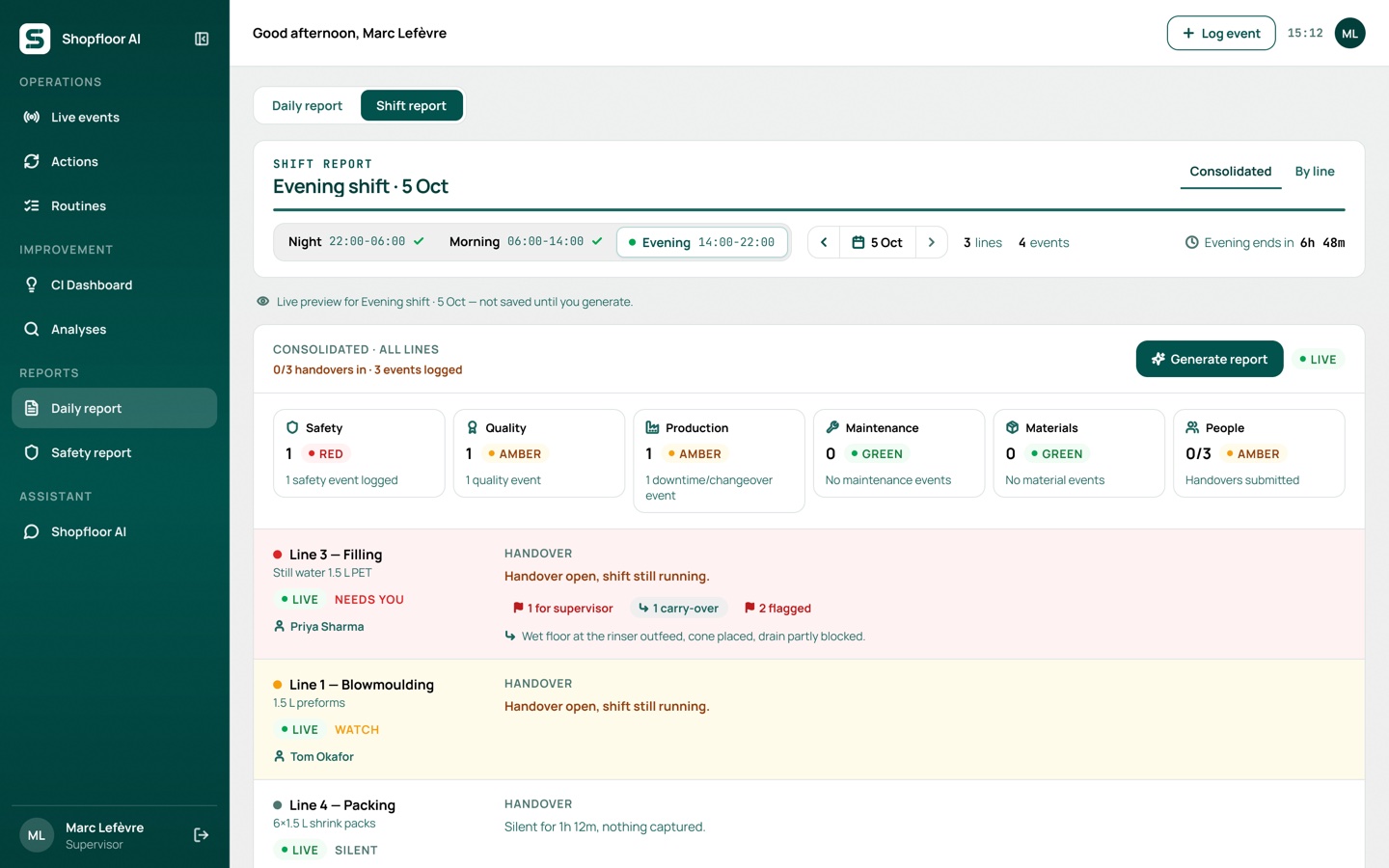
To see what an AI-drafted report looks like from your own notes, paste them into our free shift report generator.
On top of the line handovers, the supervisor generates one shift report: each line is marked Needs you, Watch or On plan, the six areas are rated green, amber or red, and it goes out by email with a PDF.
6. Rolling it out in 90 days
Start small and measure. One line for 90 days tells you more than a plant-wide launch, and gives you numbers to scale with.
- Weeks 1–2: set a baseline. Pick one line with a handover problem people already complain about. Before changing anything, count for two weeks: issues recorded per shift, open items carried over, how many of those get closed, and how long supervisors spend compiling the shift report.
- Weeks 3–4: start on that line. Train the operators and leads on that line only. Keep the face-to-face handover; replace the paper with the digital record. Agree the seven areas and the fixed time to start the handover.
- Weeks 5–12: run it and review weekly. Look at the same numbers every week with the line lead. Fix what gets in the way, such as where the phone or tablet lives, or categories that don’t match how people talk.
- Day 90: compare and decide. Put the baseline next to the last four weeks. If more issues are being recorded and open items close faster, roll out line by line.
7. Common mistakes
- Open items without one owner. “The team will look at it” means nobody will. Every open action needs one name and a due time.
- “Nothing to report” by default. A pre-filled “all OK” is the fastest way to empty a handover. Make people choose it.
- Different formats per line or supervisor. If every line hands over differently, nobody can read across lines. Fix the seven areas and their order.
- Writing for the outgoing shift, not the incoming one. “Fixed the filler” helps nobody. “Filler 2 nozzle replaced at 14:10, watch fill weights for the first hour” does.
- Dropping the conversation. A digital record supports the face-to-face handover; it doesn’t replace it. Keep the walk to the line.
8. Free shift handover checklist
Free download · PDF, one page
Shift handover checklist
The seven areas and the before, during and after steps from this guide on a single page. Print it for the shift board or use it to set up your digital handover. No sign-up needed.
9. Frequently asked questions
What is a digital shift handover?
A shift handover recorded in an app instead of on paper or a whiteboard. The outgoing shift records what happened and what’s still open, the incoming shift reads and confirms it, and the record stays searchable afterwards.
What should be included in a shift handover?
Seven areas: safety, quality, production against plan, equipment and maintenance, materials, people, and every open action with its owner and due time. If an area had nothing to report, say so explicitly rather than leaving it blank.
What are the steps in a shift handover procedure?
Before the end of the shift, the outgoing team completes the written handover. At shift change, both teams go through it together, face to face and at the line where possible. Afterwards, the incoming team confirms it, takes ownership of open items and raises anything unclear straight away.
How long should a shift handover take?
Long enough to cover the seven areas and every open action, which for a single line is usually 10 to 15 minutes. If it regularly runs much longer, the written handover is probably carrying too little and the conversation is filling the gap.
Can AI write the shift handover?
It can draft it. A tool like Shopfloor AI drafts the handover from what the team captured during the shift, and the operator checks and edits it before completing it. The handover stays the team’s responsibility; the AI saves the writing.
Do we need an MES for a digital shift handover?
No. Most of what a handover needs, such as safety observations, workarounds, open faults and who is covering what, never reaches an MES. A digital handover can start from what the team records on the line, with production figures added where you have them.